A real Mac app — not your iPhone app stretched onto a bigger screen
Built natively for macOS, with its own sidebar, layout, and feel — synced instantly with your iPhone and iPad through iCloud.
BetterKeeper for Mac is a from-scratch native app — not a Catalyst port or a resized iPad layout. It has its own sidebar navigation, its own windows, and full support for both Soft Organic and System themes. Every task, project, note, and tracked hour stays in sync with your iPhone and iPad the moment you make a change, anywhere.

Most "Mac" task apps are just iPad apps wearing a bigger window
A lot of task managers ship a Mac version by simply running their iPad app through Catalyst — same layout, same touch-sized buttons, same navigation built for a different screen and a different way of working. It feels off, and it usually is.
And when your data lives in someone else's cloud, "syncing across devices" often means waiting, conflicts, or a separate account to manage. What you actually want is one place for your tasks and projects that feels at home on every device — including the one you do your real work on.
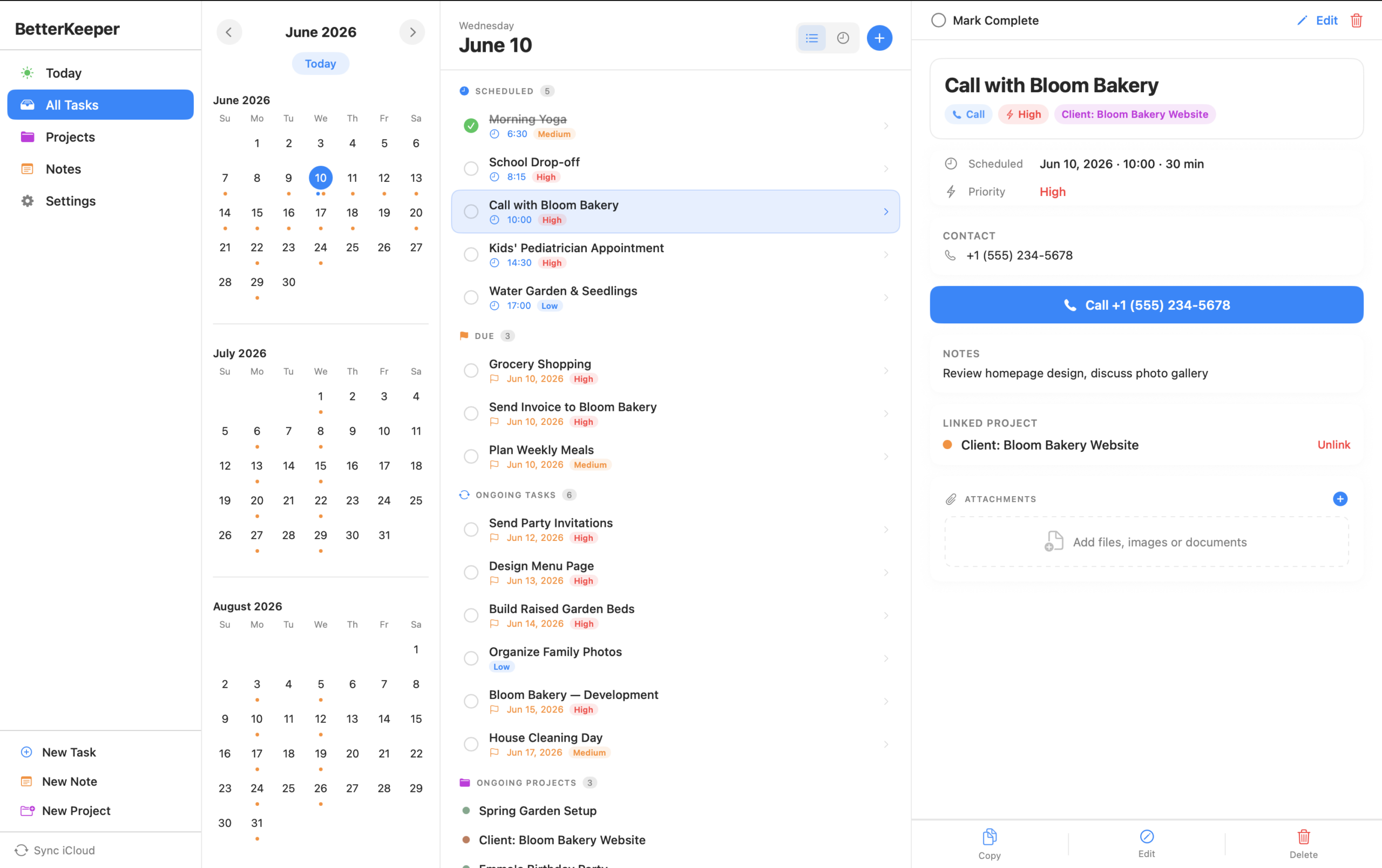
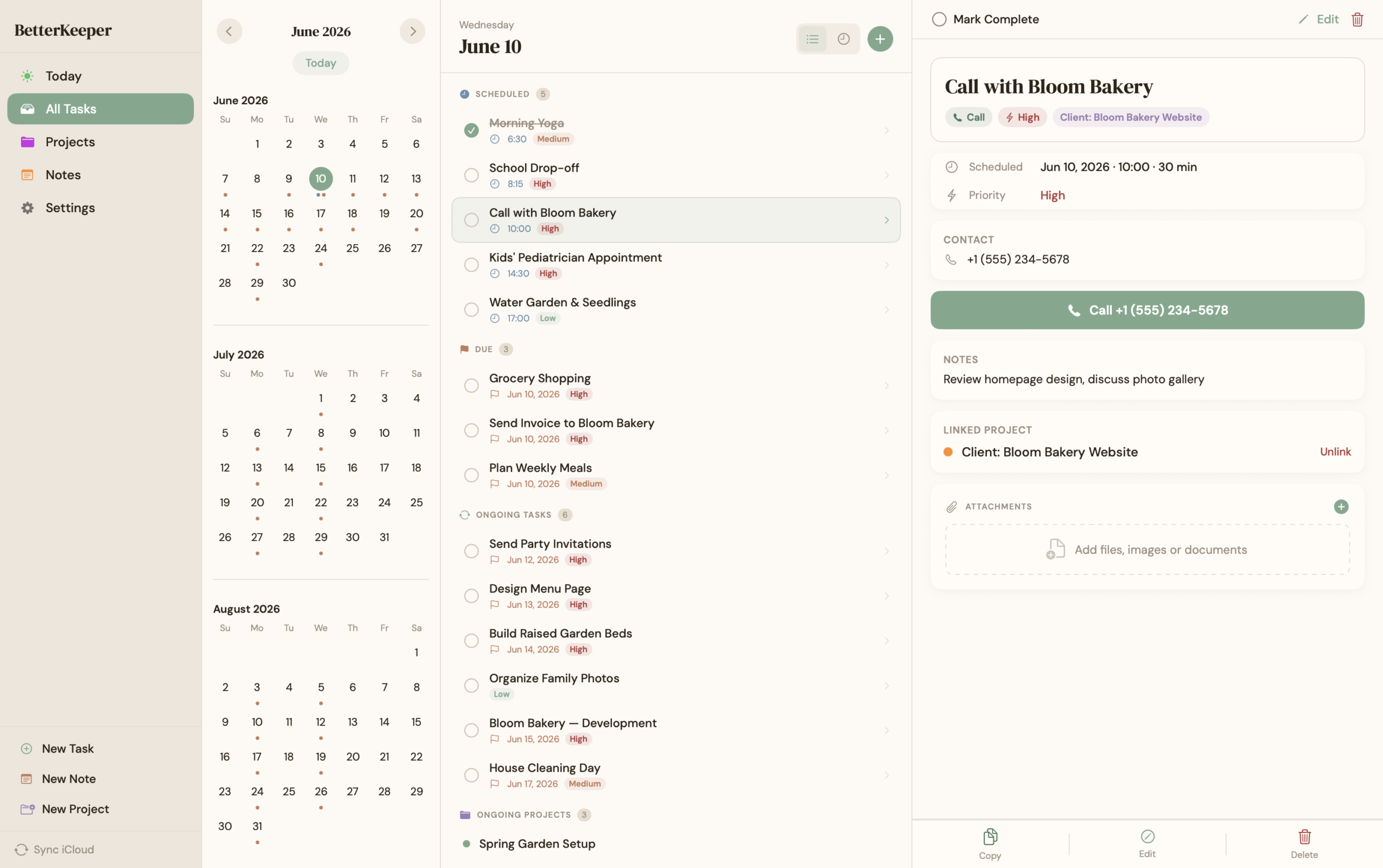
Designed for Mac from the ground up — and synced everywhere through iCloud
BetterKeeper for Mac has its own sidebar-and-detail layout — Today, All Tasks, Projects, Notes, Shared, and Settings — built the way Mac apps are supposed to work, with full keyboard and window support. Both Soft Organic and System themes are available, so the Mac app looks and feels exactly like the rest of your BetterKeeper world.
Underneath, it shares the same CloudKit container as your iPhone and iPad. Create a task on your Mac and it's on your phone before you've switched windows — no separate login, no delay, no "Mac edition" compromises.
Everything that makes BetterKeeper great — built for the Mac, not borrowed from the iPad
-
Native sidebar navigation Today, All Tasks, Projects, Notes, Shared, and Settings — laid out in a familiar Mac sidebar-and-detail view, not a stretched phone screen.
-
Instant iCloud sync with iPhone and iPad The same CloudKit container, the same account, the same data. Start a project on your Mac, finish a task on your iPhone — it's all just BetterKeeper.
-
Soft Organic and System themes, fully supported Switch between the warm, journal-like Soft Organic look and the clean native System theme — every view on Mac restyles completely, just like on iPhone.
-
Rich text notes, projects, and time tracking Write formatted notes, manage projects with progress and deadlines, and track time per task — the full BetterKeeper toolkit, at home on a bigger screen.
-
Shared projects and built-in chat See projects shared with you, manage your own shares, and chat with collaborators — all from the same Shared section you'd find on iPhone, designed for the Mac.
-
One subscription, every device Your BetterKeeper subscription covers iPhone, iPad, Mac — and CarPlay. No separate purchase, no "desktop edition" upcharge.